| Task 5-1. Change a dimension on the body of the CONNECTING_ROD to make it longer. |
- Select the Folder Browser
 , and select the ProE_models folder. , and select the ProE_models folder.
- Select the ENGINE_COMPLETE.ASM from the browser, and click Open File in Pro/E
 . .
 |
|
|
IMPORTANT- In the next step, you will be opening a second Pro/ENGINEER window. You must resize and reposition the window to the right of the tutorial. |
|
-
Click the '+' to expand PISTON_ASSY_COMPLETE in the Model Tree.
- Select CONNECTING_ROD_COMPLETE.
- Right-click and hold, then select Open.
- Double-click on the main body of the model to view the dimensions for Extrude 1.
- Double-click the 33 dimension, type 30, and press ENTER.
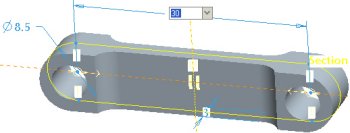
Editing a Dimension |
- Click Regenerate
 from the main toolbar to update the model. from the main toolbar to update the model.
|
|
|
You can also press CTRL + G to regenerate the model. |
| |



