 |
|
|
Working Directory
The Working Directory sets the default folder for opening and saving models. |
|
| Task 1-1. Open the ENGINE_BLOCK.PRT using the Navigator. |
- Start Pro/ENGINEER Wildfire 3.0 if necessary. The default web page displayed in the browser is the Pro/ENGINEER Wildfire 3.0 landing page.
- In the Folder Browser
 (left of the screen), locate the Intro_WF3_Tutorial folder, and expand it by clicking the '+'. (left of the screen), locate the Intro_WF3_Tutorial folder, and expand it by clicking the '+'.
- Click on the ProE_models folder to view its contents in the browser.
- Right click on the ProE_models folder and select Set Working Directory.
- Select the ENGINE_BLOCK.PRT from the browser.
- Notice a model preview appears in the browser.
- Click Open File in Pro/E
 from the browser (to the right of the preview). from the browser (to the right of the preview).
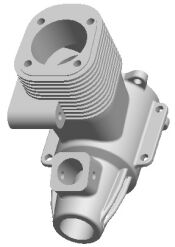
ENGINE_BLOCK.PRT | |



