|
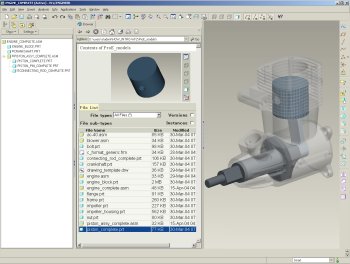
Pro/ENGINEEER Wildfire 3.0 Interface
The following are basic components of the interface:
- Graphics Window- Large gray area where the model is visible.
- Navigator- collapsible panels on the left of the screen.
- Browser- A multi-functional web browser, shown displaying a list of models and a small preview window in the center of the screen.
- Model Tree- Lists the features of a part, or the components in an assembly on the left of the screen.
- Folder Browser (not shown)- Displays on the left of the screen in place of the model tree, and lists folders on your computer or network. You can browse folders and view their contents in the Browser.
- Main Menu- Located on the top of the screen, this pull-down menu has common menu options such as File, Edit, Insert, Tools, and Help.
- Main Toolbar- An icon toolbar located at the top of the screen.
- Feature Toolbar- An icon toolbar located at the right of the screen.
- Dashboard (not shown)- A dialog bar located at the bottom of the screen when creating features or assembling components.
|



