 |
|
|
Mirroring Features
You can use the Mirror tool to mirror feature(s) about a selected plane. |
|
| Task 2-25. Mirror a series of features to quickly create the opposite side of the CONNECTING_ROD. |
- Press CTRL and select the following four features from bottom of the Model Tree (left of the screen).
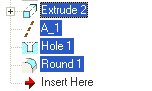
Selecting Features |
- Start the Mirror Tool
 from the feature toolbar (right of the screen). from the feature toolbar (right of the screen).
- Select datum plane RIGHT from the Model Tree.
- Click Complete Feature
 from the dashboard. from the dashboard.
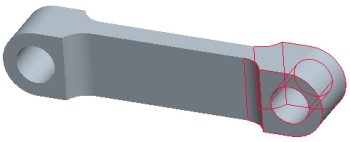
Features Mirrored |
|
|
|
Pro/ENGINEER Wildfire has a number of editing tools to quickly duplicate features, including Mirror, Copy/Paste, and Pattern. |
|
- Click Save
 from the main toolbar and click OK. from the main toolbar and click OK.
- Click File > Close Window
 . .
This completes the second exercise. |



