|
Creating Part Models
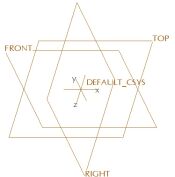
New Part models are created from a default template, which contains default datum planes and a coordinate system.
Default datum planes provide 3 orthogonal planes in 3D space that can be used as initial references when creating features on models.
All default templates in this tutorial are setup to use millimeters. | 


 from the main toolbar.

 from the main toolbar.
 , Datum Points
  , and Coordinate Systems
  from the main toolbar (top of the screen) to disable their display.