 |
|
|
Creating Sketches
A Sketch is a basic 2D shape used to create a feature, and is created on a planar reference.
Once created, sketches may be easily used to create 3D features. |
|
| Task 2-2. Create a circular sketch to be used for the main body of the model. |
- Start the Sketch Tool
 from the feature toolbar (right of the screen). from the feature toolbar (right of the screen).
- Select datum plane FRONT from the model.
- Click Sketch from the Sketch dialog box.
- Click Datum Planes
 from the main toolbar (top of the screen) to disable their display. from the main toolbar (top of the screen) to disable their display.
- Sketch a circle as shown in the following figure:
- Click Circle
 from the sketcher toolbar (right of the screen). from the sketcher toolbar (right of the screen).
- Position the cursor to snap at the intersection of the dashed reference lines.
- Click and release to place the circle center, move the mouse outward, then click and release again.
- Click Select Items
 from the sketcher toolbar (right of the screen) to allow items to be selected. from the sketcher toolbar (right of the screen) to allow items to be selected.
- Notice that a dimension was automatically created.
- Double-click the diameter dimension value, type 5, and press ENTER.
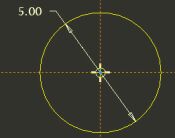
Creating a sketch |
- Click Complete Sketch
 from the sketcher toolbar (right of the screen). from the sketcher toolbar (right of the screen).
- Click Saved View List
 from the main toolbar and select Standard Orientation. from the main toolbar and select Standard Orientation.
- Click Datum Planes from the main toolbar to enable their display.
|



