 |
|
|
Cleaning Up Dimensions
You can quickly Cleanup Dimensions in a view once they are shown. This spaces them out from the view. Only linear dimensions are effect by dimension cleanup. |
|
| Task 4-10. Show and cleanup dimensions on the FRONT and TOP views. |
- Click on the FRONT view, then right-click and select Cleanup Dimensions.
- Enter 0.75 for both the Offset and Increment values in the Clean Dimensions dialog box.
- Uncheck Create Snap Lines, and click Apply > Close.
-
Click Refit  from the main toolbar. - Select the TOP view, right click and select Show Dimensions.
- Right-click again and select Cleanup Dimensions.
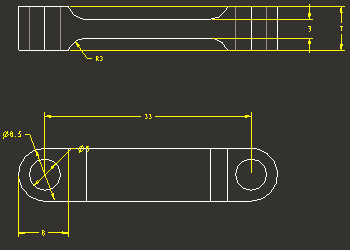
Dimensions in TOP View | |



