 |
|
|
Showing Dimensions
You can quickly Show Dimensions that were created in the part model. Dimensions are created when modeling features, such as dimensioning a sketch, or entering the depth of a hole. |
|
| Task 4-9. Show and cleanup dimensions on the FRONT view. |
- Select the FRONT view, then right click and select Show Dimensions.
- Press CTRL, press and hold the middle mouse button, and move the mouse towards you to zoom in on the view.
- Select the 8 dimension, then drag to reposition it as shown in the following figure.
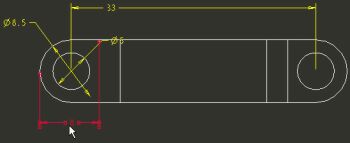
Dimension Moved |
|



