59/76 
 
 
Information

Explode States

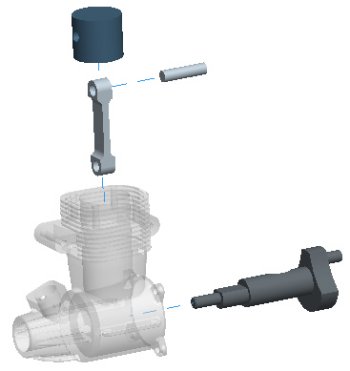
There are two differences between the ENGINE_COMPLETE.ASM and the one you created: The second difference is that there is an Explode State pre-created for you, which will also be used in the creation of the drawing.

Explode States allow you to define a 'take-apart' view of an assembly.


Task 4-3. Examine the explode state in the ENGINE_COMPLETE assembly.

  1. From the View Manager dialog box, select the Explode tab. 
    • Double-click on Exp_1 to view the explode state.
    • Right-click in the View Manager dialog box and uncheck Explode.
    • Click Close from the View Manager dialog box.


Explode State Exp_1