52/76 


Information

Assembling with Connections

A Cylinder connection allows a component to rotate and translate along the rotation axis.

Task 3-7. Add the PISTON_ASSY to the ENGINE assembly, then create a Cylinder connection.

  1. Click Add component from the feature toolbar.
    • Select PISTON_ASSY.ASM and click Open.
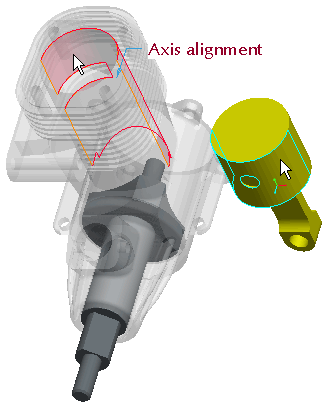
  2. Create a cylinder connection as shown in the following figure:
    • Press CTRL + ALT, press and hold the right mouse button, and reposition the PISTON_ASSY.ASM as shown.
    • Change the connection type from User Defined to Cylinder.
    • Select the cylindrical surfaces as shown.


Selecting Surfaces