 |
|
|
Using the Search Tool
The Search Tool provides an easy way to select items that are not visible.
In this case, datum planes are being selected to align the CONNECTING_ROD to the center of the PISTON_PIN. |
|
| Task 3-4. Complete the Pin connection on the CONNECTING_ROD. |
- Search for the first datum plane:
- Start the Search Tool
 from the main toolbar. from the main toolbar.
- Select Datum Plane the Look For object.
- Select PISTON_PIN.PRT as the Look In object.
- Click Find Now, select the FRONT datum plane, and click Add Item
 . .
- Click Close.
- Search for the second datum plane:
- Start the Search Tool from the main toolbar, and click Find Now.
- Select the FRONT datum plane, click Add Item , then click Close.
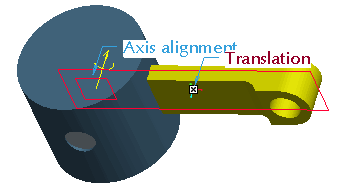
Assembling the CONNECTING_ROD.PRT |
- The Pin connection is now defined, click Complete Component
 from the dashboard. from the dashboard.
- Click Drag Component
 from the main toolbar. from the main toolbar.
- Click and release on the CONNECTING_ROD, reposition as shown, then click again to accept the new position.
- When finished, click Close from the Drag dialog box.
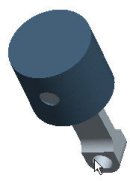
PISTON_ASSY.ASM |
- Click Save
 from the main toolbar and click OK. from the main toolbar and click OK.
- Click File > Close Window
 . . |



