|
Assembling with Connections
You can assemble components together in an assembly by creating various types of Connections. Connections can be used to create realistic mechanical joints between components. These joints will allow assembly components to move as a mechanism.
Connections can be created by selecting corresponding pairs of geometry from the component being assembled and an existing component.
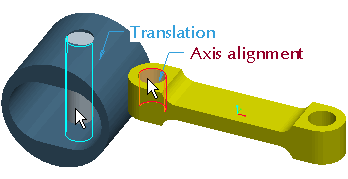
A Pin connection allows a component to rotate, but not translate along the rotation axis. | 


 from the feature toolbar.
 from the main toolbar and select Standard Orientation.