| Task 2-20. Dimension and complete the sketch. |
- Click Dimension
 from the sketcher toolbar. from the sketcher toolbar.
- Select the arc, and the vertical line, then middle-click to place the dimension.
- Middle-click to stop sketching and to allow items to be selected.
- Double-click on the dimension value, type 8, and press ENTER.
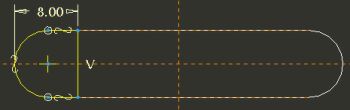
Dimension Created |
- Click Complete Sketch
 from the sketcher toolbar. from the sketcher toolbar.
- Click Saved View List
 from the main toolbar and select Standard Orientation. from the main toolbar and select Standard Orientation.
- Click Shading
 from the main toolbar. from the main toolbar. |



