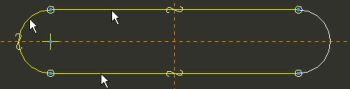
You can use the Entity from Edge tool to trace existing geometry. The created entities will 'snap' to the existing geometry without the need for dimensions.
Task 2-18. Begin creating a second sketch by tracing existing geometry.
Start the Sketch Tool from the feature toolbar.
Click Use Previous from the Sketch dialog box.
Sketch as shown in the following figure:
Click Datum Planes from the main toolbar to disable their display.
Click No Hidden from the main toolbar.
Click Entity from Edge from the sketcher toolbar.
Select the arc and the two straight edges as shown in the following figure.



 from the feature toolbar.
  from the main toolbar to disable their display.
 from the main toolbar.
 from the sketcher toolbar.