35/76 
 
 
Information

Tangent Lines and Dynamic Trim

The 2-Tangent Line allows you to easily sketch lines tangent to 2 entities.

The Dynamic Trim tool allows you to remove unwanted portions of sketched entities.  A freehand curve is dragged through the sketch, and any entities intersected by it will be deleted.


Task 2-16. Continue the oval sketch for the CONNECTING_ROD.

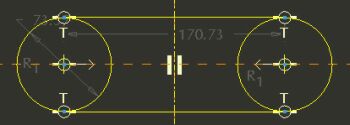
  1. Continue the sketch as shown in the following figure:
    • Click the black arrow on the Line Types Flyout  in the sketcher toolbar and select 2-Tangent Line .
    • Allowing the cursor to snap to the circles, sketch two horizontal lines as shown.


Sketching Lines

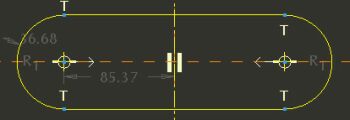
  1. Click Dynamic Trim from the sketcher toolbar.
    • Place the cursor inside one of the circles.
    • Click and hold the left mouse button, and then drag a freehand curve through the inner arcs to remove them (any entities intersected by the freehand curve will be deleted).

  
Trimming Completed


Tip
Click Undo and use Dynamic Trim again if necessary.