31/76 
 
 
Information

Creating Linear Holes

Holes remove material from a model and have a cylindrical shape by default. 

Linear holes require Primary and Secondary references.  The primary reference is placement plane, and the secondary references dimensionally locate the hole.  


Task 2-12. Begin creating a hole in the center of the PISTON.

  1. Click Saved View List from the main toolbar and select Standard Orientation.
  2. Click Datum Planes  from the main toolbar to enable their display.
  3. Start the Hole Tool from the feature toolbar, and select datum plane FRONT from the model. 
    • Right-click and hold, then select Secondary References Collector.
    • Press CTRL and select datum planes TOP and RIGHT from the model to dimensionally locate the hole.

Note

Notice that you must press and hold the CTRL key to select multiple references.

  1. Continue the hole as shown in the following figure:
    • Click Saved View List from the main toolbar and select FRONT.
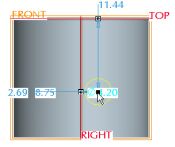
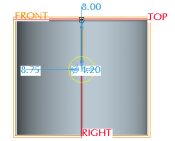
    • Drag the location handle (in the center of the hole) to position the hole approximately as shown in the following figure on the left.
    • Select the Placement tab in the dashboard, modify the offset value
      from datum plane TOP to 8, and press ENTER.
    • Change the dimension type for datum plane RIGHT from Offset to Align.


Positioning the Hole