 |
|
|
Changing the Depth Direction
You can flip the feature to the other side of its sketching plane by using the Change Depth Direction option. |
|
|
Task 2-5. Use the previous sketch to create the first Extrude feature. |
- With the sketch still selected, create an Extrude feature as shown in the following figure:
- Start the Extrude Tool
 from the feature toolbar (right of the screen). from the feature toolbar (right of the screen).
- Double-click on the depth value, type 18.5, and press ENTER.
- Click Change Depth Direction
 in the dashboard (bottom of the screen) to flip the direction of feature creation downward. in the dashboard (bottom of the screen) to flip the direction of feature creation downward.
- Click Complete Feature
 from the dashboard. from the dashboard.
|
|
|
The snapping interval for drag handles is currently set to 1mm, so decimal values must be typed in. |
|
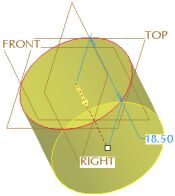 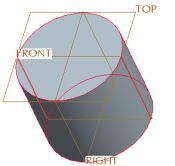
Extrude Feature Created | |



